Flow BDD Introduction
Overview
Turn your automated tests into living product documentation — without the BDD (behavior-driven development) overhead.
The Purpose of Functional Testing including BDD
Testing isn’t just about catching bugs. When done correctly, automated tests serve critical functions:
- Verifying Behavior: Ensuring the system does exactly what the business intended.
- Enabling Refactoring: Providing the safety net needed to improve code without breaking functionality.
- Living Documentation: Acting as the ultimate source of truth for how the system actually works.
- Increased agility: See Philosophy & Culture more:
- Waste Elimination
- Iterating with Fast Validated Feedback
- Value Amplification
The Problem: Inefficiency and the “Cucumber Trap”
The conventional approach to BDD (like Cucumber or Gherkin) tries to solve this but often introduces Waste and is suboptimal at solving the above. By forcing you to maintain separate feature files and “glue code,” it creates:
- Complexity: You spend more time managing the framework than testing the product.
- Fragility: Tests break because of text changes, not logic changes.
- Documentation Rot: Feature files quickly drift from the actual code behavior.
The Solution: Flow BDD
Flow BDD is the most productive way to implement Behavior Driven Development by turning the process on its head. Instead of writing static feature files first, you write clean, best-practice code first.
Flow BDD then automatically generates:
- Interactive Feature Files: Documentation that is always in sync with your code.
- UML Diagrams: Visualizing downstream interactions and data flows (HTTP headers/bodies).
- Living UI: A generated dashboard with buttons to re-run tests and modify parameters on the fly.
Focus on testing the behavior with best practices. Automate the documentation.
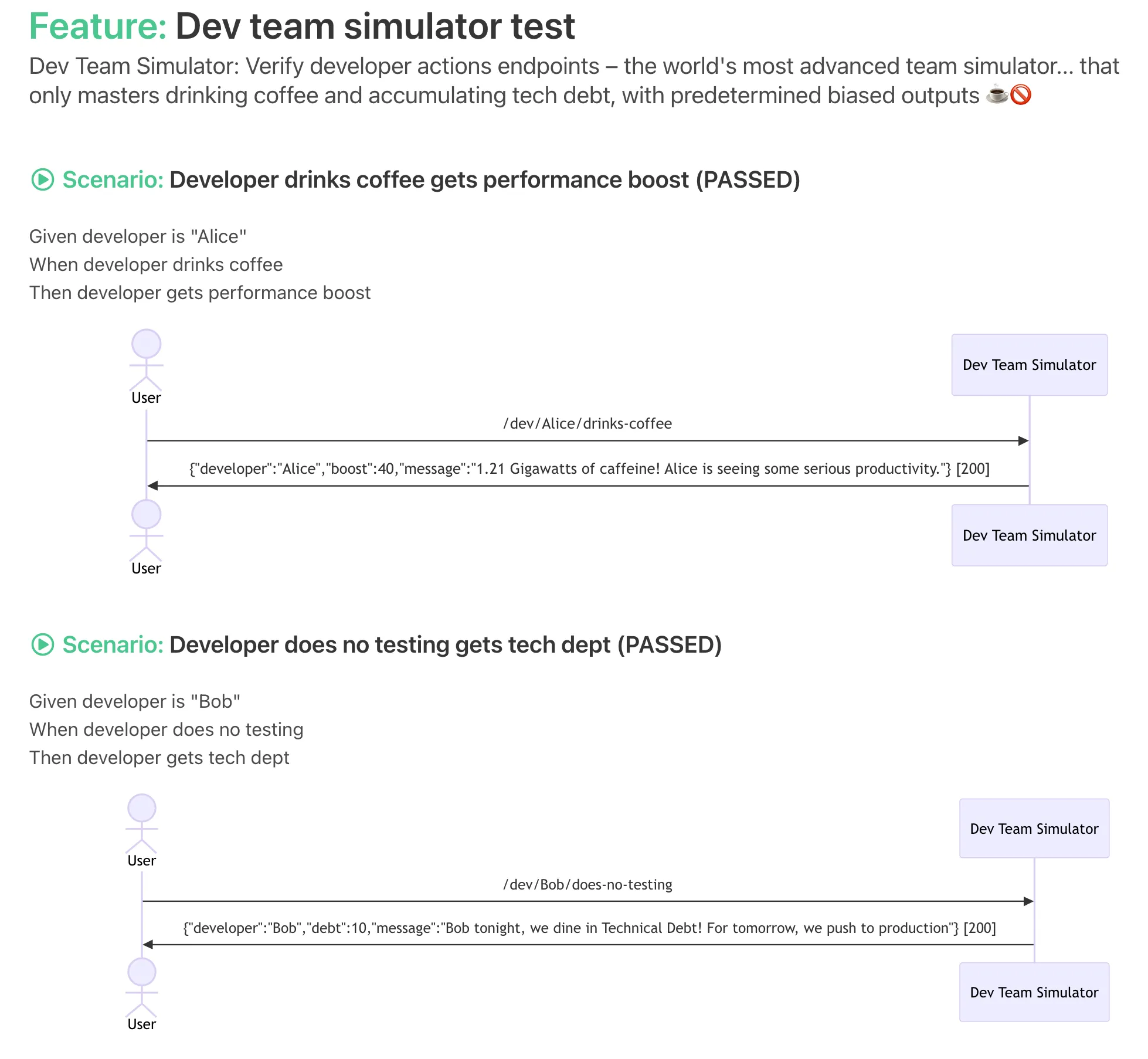
This is an example of the documentation generated from the following test below:
@ExtendWith(FlowBdd.class)
public class DevTeamSimulatorTest extends BaseTest {

    @Override
    public void doc() {
        featureNotes("Dev Team Simulator: Verify developer actions endpoints – the world's most advanced team simulator... that only masters drinking coffee and accumulating tech debt, with predetermined biased outputs ☕🚫");
    }

    @Test
    void developerDrinksCoffee_getsPerformanceBoost() throws Exception {
        givenDeveloperIs("Alice");
        whenDeveloperDrinksCoffee();
        thenDeveloperGetsPerformanceBoost();
    }

    @Test
    void developerDoesNoTesting_getsTechDept() throws Exception {
        givenDeveloperIs("Bob");
        whenDeveloperDoesNoTesting();
        thenDeveloperGetsTechDept();
    }
}
How does it work?
Flow BDD uses a process called Wordify to turn your clean Java code into human-readable documentation.
For example, a test method like whenDeveloperDrinksCoffee() is automatically tokenized to:
When developer drinks coffee.
It gives you the freedom to write tests in the way you want, without the “Gherkin tax.” There is a simple API to:
- Add Notes: Use
featureNotes()to set the scene (e.g., explaining that your simulator only masters coffee and tech debt). - Capture Interactions: Automatically generate Sequence Diagrams showing the flow between a
Userand theDevTeamSimulator. - Inspect Data: Capture HTTP request/response headers and bodies (like the “1.21 Gigawatts of caffeine” payload).
- Interactive Control: It leverages JUnit 5 to provide a UI where you can re-run tests or even modify parameters on the fly.
The Outcome: BDD that Scales
By removing the “Gherkin tax” and focusing on code-first documentation, Flow BDD delivers:
- Zero Drift: Your documentation is a reflection of your code, not a separate text file that you hope someone remembered to update.
- Maintainable Tests: No regex glue layers or “step explosion.” If your code compiles, your documentation is ready.
- Better Practice baked in: The framework encourages clean, builder-based test design (like our
DevTeamSimulatorTest) which naturally leads to better system architecture. - Trustworthy Specs: When a test fails, you aren’t just looking at a stack trace; you’re looking at a Sequence Diagram of exactly where the communication broke down.
Core Capabilities
- Living Documentation: Automatically generate HTML feature files directly from your Java or Kotlin or hopefully any JVM test code.
- Visual Flow Analysis: Integrated Mermaid.js support to capture downstream interactions and render them as UML Sequence Diagrams.
- Deep Data Inspection: Capture and display full HTTP request/response payloads (headers and bodies) within the documentation.
- Fluent Test Design: Encourages the use of Type-Safe Builders, leading to more consistent state setup and more readable assertions.
- Zero Glue Layer: Eliminate the complexity of traditional BDD frameworks. No regex, no separate feature files, no “Gherkin tax.”
The Roadmap: Toward Peak Productivity
Flow BDD is evolving. Here is what’s on the horizon:
- AI Context Engine: LLMs are the “missing glue.” We are integrating AI to answer questions like “How does the checkout flow actually work?” or “Should the Developer receive a 401 when the coffee machine is empty?” by using your living documentation as the source of truth.
- AI Boundary Guard: If you choose to use AI to generate more code, testing at a boundary becomes non-negotiable. Flow BDD will provide the safety net to ensure AI-generated logic follows the expected behavior.
- Interactive Test Runner: A built-in UI to re-run specific tests and modify parameters (like coffee intake!) on the fly.
- Asynchronous Actions: Wrapping steps in async actions to significantly improve test execution performance.
- Intelligent Mutation Testing: Automatically validate the correctness of your scenarios by mutating steps and asserting state changes.
- Declarative JSON Builders: Generate Type-Safe builders directly from JSON schema definitions.
- Persistent Analytics: Store test results over time to query trends, irregular failures, and performance regressions.
AI Philosophy
- A Tool, Not a Replacement: I use AI every day, but it’s a co-pilot, not the captain. AI can write implementation faster than us, but it doesn’t always understand the intent and or optimise for code quality
- The “Coffee Gap”: An AI can write a
drinks-coffeeendpoint in 2 seconds, but Flow BDD can tell the AI: “Hey, Alice is still sleepy, you forgot to calculate the productivity boost!” ☕️🤖 - Making Code “LLM-Readable”: LLMs struggle with large, messy codebases, but they thrive on structured BDD steps and Sequence Diagrams. Flow BDD provides the high-signal context that AI needs to be actually useful.
Testing 30,000 ft view: The Assurance Scale
E2E and Integration tests are not enough. They tell you if a system works, but they don’t always tell you why or if it’s doing the right thing at the boundary. If you are using AI to generate code, this is even more important.
Flow BDD focuses on Behavioral Assurance:
- Unit Tests: (The “How”) Logic verification.
- TDD Test Driven Development: Drives architecture. Tests are a by product.
- Integration Tests: (The “Connection”) Validates the integration between components and external systems.
- Flow BDD: (The “What & Why”) Behavioral verification.
Philosophy & Culture
I developed VIEW MAP Communication & Culture - The core principles that serve as the fundamental building blocks of productivity and competitiveness. Traditional BDD often introduces Waste (the “Gherkin tax,” fragile glue code, and documentation drift) and therefore impacts Iterating with Fast Validated Feedback and Value. Value is added by using Flow BDD that ensures we build exactly what was intended.
We believe in:
- Waste Elimination: Identify and remove non-value-adding activities.
- Iterating with Fast Validated Feedback: Develop products and services through continuous, feedback-driven iterations. This leads to shared knowledge, which is far more important than most people realize.
- Value Amplification: Focus on increasing the value delivered to customers.
Learn more here: VIEW MAP: Communication & Culture in Engineering.
Getting Started
1. Installation
Include the dependency in your build.gradle.kts:
testImplementation("io.techthinking:flowbdd:0.1.1-SNAPSHOT")
Example POM for Maven:
<groupId>io.techthinking</groupId>
<artifactId>flowbdd</artifactId>
<version>0.1.1-SNAPSHOT</version>
2. Usage
Annotate your test class with @FlowBdd
@ExtendWith(FlowBdd.class)
public class MyFirstFlowTest {
    @Test
    void myAwesomeScenario() {
        givenSomething();
        whenAnActionIsPerformed();
        thenTheResultIsVerified();
    }
}
How to Run the Demo
Want to see it in action? The Dev Team Simulator is our hero example:
- Clone the repo:
git clone https://github.com/techthinking-io/flowbdd.git - Run the test:
- Run
DevTeamSimulatorTestin your IDE ./gradlew :examples:devteam:test
- Open the Report:
Check your IDE/Terminal console. Flow BDD automatically prints a direct link to your living documentation:
HTML Suite: file:///tmp/flowbdd/report/TEST-io.techthinking.flowbdd.examples.devteam.bdd.DevTeamSimulatorTest.html
Other examples:
Please see
examples:bookstoreexample:cucumbers- Run
GetBookTestand orEatCucumbersTest
Testing & Deploying
- Run all tests:
./gradlew test
- Publish to Maven Local:
./gradlew publishToMavenLocal
- To check the jar was created in maven local:
ls -la ~/.m2/repository/io/techthinking/flowbdd
Then use the following in your app, please check what version to use
testImplementation("io.techthinking:flowbdd:0.1.1-SNAPSHOT")
Flow BDD Github project contains:
| Project Name | Package | Description |
|---|---|---|
| flowbdd | io.techthinking.flowbdd.report | The core JUnit 5 extension and report engine. |
| wordify | io.techthinking.flowbdd.wordify | The engine that translates Java code into natural language. |
| flowbdd-diagrams | io.techthinking.flowbdd.report.mermaid | Mermaid.js wrapper for Sequence Diagrams. |
| examples | io.techthinking.flowbdd.examples | Demo projects (DevTeam, Bookstore, Cucumbers). |
Contributing & Contact
I am actively looking for real-world use cases! If you’re interested in migrating legacy tests or starting a new project with Flow BDD, I’d love to help.
- Maintainer: James Bayliss
- GitHub: jrbayliss
- Repo: https://github.com/techthinking-io/flowbdd
- Website: https://techthinking.io
- With thanks to the Yatspec https://github.com/bodar/yatspec project for the initial inspiration!